
1️⃣ Start With the Problem, Not the Product
Before buying any device, ask yourself:
What problem am I trying to solve?
For example:
💡 Easier lighting control?
🌡️ Better AC control?
🚪 Door monitoring?
🔐 Home security?
🎬 Lighting and curtain scenes?
Start with the need, then choose the technology.
2️⃣ Choose Where to Start
You don't need to make your entire home smart on day one.
You could start with:
💡 Lighting
Smart Switches or Smart Bulbs.
🌡️ Air Conditioning
A compatible Smart AC Controller or another suitable solution.
🔐 Security
Cameras, Door Sensors, and Motion Sensors depending on your needs.
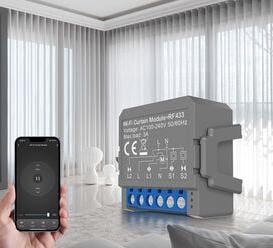
🪟 Curtains
Compatible Smart Curtain Motors or Controllers.
Then expand gradually.
3️⃣ Choose Your Connectivity
As we discussed in Day 3:
📶 Wi-Fi
Suitable for many Smart Home devices, with some devices working directly without a separate Hub.
🔗 Zigbee
Commonly used for low-power Smart Home devices such as certain sensors, often through a compatible Hub or Gateway.
🌐 Matter
A Smart Home standard designed to improve interoperability between supported devices and platforms.
Your entire home doesn't necessarily need to use one technology.
What matters is whether your overall system supports the integrations you need.
4️⃣ Do You Need a Hub?
Not every Smart Home needs a Hub.
Some devices may work like this:
Device → Wi-Fi → Router
Others may work like:
Sensor → Zigbee → Hub → Smart Home Platform
The right approach depends on:
- Your devices.
- Required protocols.
- Ecosystem.
- Automation requirements.
- Future expansion plans.
5️⃣ Check Compatibility
This is one of the most important steps.
Before buying a device, check:
🔗 Compatibility
📡 Protocol
🌐 Ecosystem
⚙️ Hub / Controller requirements
📱 Supported platforms
🔧 Required accessories
Don't rely only on the word “Smart” or the name of an ecosystem.
Check the exact model.
6️⃣ Plan for Future Expansion
Today you may have:
💡 3 Smart Switches
A year later, you might have:
💡 Switches
🚪 Sensors
📷 Cameras
🌡️ AC Controllers
🪟 Curtains
🔌 Smart Plugs
That's why it's worth asking:
Will the choices I make today make it easier to expand tomorrow?
7️⃣ Think About Automation
This is where a Smart Home can move beyond simple remote control.
For example:
🚪 Door opens
↓
💡 Lights turn on
Or:
🌙 Bedtime
↓
💡 Lights dim
🪟 Curtains close
❄️ AC adjusts according to your settings
Or:
🚶 Motion detected
↓
💡 Lights ON
The exact automation capabilities depend on the devices and platform you use.
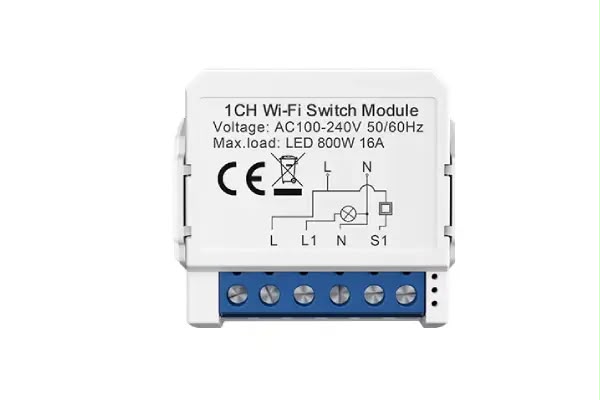
8️⃣ Choose a Smart Switch or Relay Based on Your Home
If you're working with lighting or electrical circuits, remember the points from Day 6.
Check:
⚡ Neutral Wire
🔌 Electrical load
📦 Switch-box space
📐 Device dimensions
🛠️ Installation requirements
Don't assume that every Smart Switch will work with every electrical circuit.
9️⃣ You Don't Need a Huge Budget to Start
One common misconception is that a Smart Home has to start with a large investment.
You can start with one practical solution:
Smart Switch + Simple Automation
Learn from it.
Then gradually add:
Sensors → AC → Curtains → Security → More Automation
🧠 A Smart Home Is a System
Instead of thinking about every device as an independent product, look at the bigger picture:
Your needs
↓
Devices
↓
Protocol
↓
Hub / Controller when needed
↓
Ecosystem
↓
Compatibility
↓
Automation
↓
🏠 Smart Home
✅ Before You Start — Checklist
Ask yourself:
☑️ What problem am I trying to solve?
☑️ Where will I start?
☑️ What's my budget?
☑️ Should I use Wi-Fi, Zigbee, Matter, or a suitable combination?
☑️ Do I need a Hub?
☑️ Are my devices compatible?
☑️ Can the system expand later?
☑️ Is my electrical wiring suitable?
☑️ Do I need a qualified installer?
☑️ What automations do I want to create?
Answering these questions before buying can help you build a system instead of simply collecting devices.
🎯 The Bottom Line
A Smart Home isn't a competition to see who has the most devices.
And you don't need to build everything at once.
Start with a real need.
Choose the right devices.
Check connectivity and compatibility.
Plan for expansion.
Then use automation to make your devices work together as a system, rather than simply controlling them individually from your phone.
🏠 Your Smart Home Journey Starts Here
If you missed any part of the Smart Home from Scratch series, go through the articles in order:
1️⃣ What Is a Smart Home?
2️⃣ How to Start From Scratch
3️⃣ Wi-Fi or Zigbee?
4️⃣ Do You Need a Smart Home Hub?
5️⃣ Will Your Smart Devices Work Together?
6️⃣ Smart Switch vs. Smart Relay
7️⃣ How to Build a Complete Smart Home
Smart Home Hub
Understand first. Choose better.

.jpeg?alt=media&token=53683cf5-bd93-4044-89ea-74ebe37f9f65)